You have changed the address on your accounts, found the grocery store and started learning the roads. One more move-in task deserves a place near the top of the list: deciding how weather alerts will reach you in the new home, including while you are asleep.
If you are new to Northern Alabama, the mix of weather radios, outdoor sirens and phone alerts can be confusing. They are different tools with different jobs. A sensible setup is not about watching the forecast every minute. It is about arranging more than one way to get your attention, understanding the message, and knowing what you will do next.
Start with the job each alert channel performs
Think of your setup as a small household system. One channel may be useful when you are away from home; another can stay ready beside the bed. None should become a reason to ignore an official warning received through a different channel.
| Channel | Useful role | Move-in check |
|---|---|---|
| NOAA Weather Radio | A dedicated receiver for broadcasts and, with suitable equipment, alerting | Check receiver features, local signal, area programming and backup power |
| Wireless Emergency Alerts | Urgent messages delivered through participating mobile carriers to capable phones | Confirm device support and emergency-alert settings |
| Local notification service | Additional messages offered by local authorities | Ask the county EMA which service applies and how to enroll |
| Outdoor sirens | An outdoor warning cue | Learn local policy; do not use as your indoor wake-up plan |
A weather radio needs the right features and local setup
NOAA Weather Radio broadcasts require a receiver capable of receiving the weather band; a simple AM/FM radio does not receive those broadcasts. Also check whether the receiver automatically alerts. Being able to listen to a weather broadcast is not the same feature as being alerted when the audio is otherwise quiet. The NWS receiver guide explains the distinction.
SAME, or Specific Area Message Encoding, lets compatible receivers select alerts for particular areas, and the NWS identifies battery backup as an important receiver feature. Use the manufacturer’s instructions for your model, rather than button-by-button directions for a different radio. Keep those instructions somewhere you can find after the boxes are unpacked.
Choose an alert arrangement the people in your household can actually perceive. If an audible alarm is not sufficient, ask the manufacturer about compatible visual or vibrating accessories and appropriate setup. Do not assume a device on the other side of the home will wake every sleeper. Treat that as something to evaluate before weather is threatening, not during an alert.
NWS Huntsville notes that radio reception depends on factors including terrain, the receiver and atmospheric conditions. Listen to the broadcast where you intend to keep the radio, follow its setup instructions and check alert operation. Moving a radio from one home to another is a reason to recheck it, even if the move stayed within North Alabama.
Your county and transmitter are not interchangeable
North Alabama is not one radio setting. Use the county where the home actually sits, and check a suitable transmitter for that location. Do not copy a friend’s settings simply because their mailing city sounds nearby.
The Huntsville office’s transmitter table lists Limestone County with SAME code 001083 and the Huntsville transmitter at 162.400 MHz; Colbert County is listed with code 001033 and the Florence transmitter at 162.475 MHz. Those examples show why you should use the official county/transmitter table rather than one regional preset. They are not a promise of reception at an individual house.
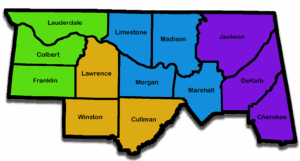
If your county is not shown in that office’s table, use the NWS national receiver information and county/station resources to find the appropriate listing. The site’s Northern Alabama coverage area and a weather office’s service area are not automatically the same boundary. Ask the responsible NWS office for help if the listing or reception is unclear.
NWS Huntsville says its routine weekly radio test usually takes place on Wednesday between 11 a.m. and noon, except when weather conditions require a change. Use the office’s current radio guidance to check the applicable test. If you miss an expected test, check programming and reception and seek help; do not decide that an unused-looking radio is ready simply because it has power.
Phone alerts and local sign-ups are separate things
Wireless Emergency Alerts, or WEA, do not require an app download or subscription; they are sent by authorized alerting authorities through mobile carriers to capable phones. Check your phone’s emergency-alert settings and your carrier’s guidance. Menus and capabilities vary, so instructions for someone else’s phone may not match yours.
The NWS distinguishes WEA from local services that ask residents to register for calls, texts or emails. After a move, find out whether there is a local enrollment to complete or an old address to replace. Alabama EMA’s county contact directory provides a route to the emergency-management office for your county. Ask which notification service applies to your address and what information it sends.
WEA does not carry every weather warning: the NWS lists severe-thunderstorm WEA messages only for a destructive damage threat, for example. A phone that has not sounded is not evidence that there is no warning relevant to you. Review the NWS WEA explanation and keep another alert source ready.
Keep your phone charged and your alert setup current when you replace a device. If you use a weather app as an additional source, review its selected places and notification permissions after the move. Checking the forecast for the old home is an easy habit to carry into the new one; make the change deliberately.
Outdoor sirens are not an indoor alarm system
NWS guidance says outdoor sirens are intended for outdoor warning, not to be heard inside a building or to wake sleepers, and local officials operate them. Even if you happen to hear a test inside, do not make that sound your only overnight plan.
A siren stopping does not mean that the weather threat has ended. Follow official information about the hazard and its duration. The NWS explains these general siren limits; your county EMA can explain the local activation and test policy. Do not assume a policy you learned in another city applies at the new address.
Pair the alert with an action you have already discussed
A tornado watch means tornadoes are possible in or near the watch area; a tornado warning means a tornado has been sighted or indicated by radar and calls for immediate protective action. Review the NWS watch-and-warning guidance with the household before you need it.
For a tornado warning, the NWS directs people to an interior room on the lowest floor of a sturdy building, away from windows; people in mobile homes, vehicles or outdoors need substantial shelter. Work out the appropriate plan for your living situation in advance, using official guidance and local emergency-management help. Do not wait for a second device or a siren to agree before following an urgent warning.
Make the move-in check concrete: identify the county, set up and test the radio according to its instructions, review phone settings, find the local notification service, and discuss where everyone will go. Include anyone who may need assistance and the people who regularly care for children or visit overnight. Revisit the setup when you change homes, phones or equipment.
Conclusion: settle the alert routine before you need it
A new home brings plenty of unfamiliar details. Weather alerts become easier to manage when each tool has a clear purpose: a correctly set-up radio at home, a checked phone, relevant local notifications and an understanding of what sirens can tell you. The goal is a routine you have tested, not a collection of devices you hope will work.
Take care of the settings and the household conversation while the day is quiet. Then keep the official links handy and use the actual warning instructions when conditions change. That is a practical part of getting comfortable in Northern Alabama, whether you are renting first, buying now or moving between communities.
Want Personalized Real Estate Help?
If you are relocating to Northern Alabama or preparing for your next home here, I can help you organize the everyday questions that belong alongside the real-estate search. Contact me to talk about your move. We can identify the property and community questions to ask while keeping weather and emergency guidance with the responsible local experts.
Sharing is Caring:
Author